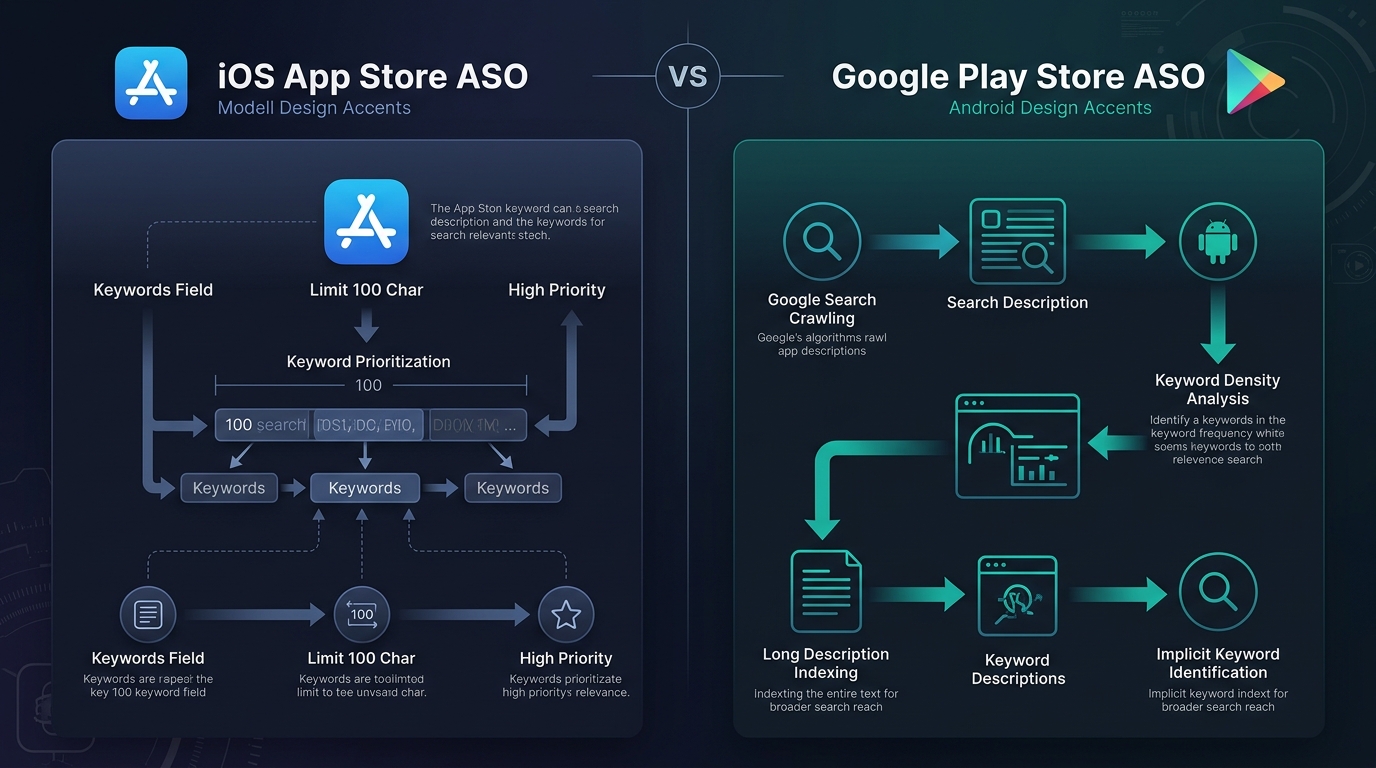
Why you cannot copy-paste your cross-platform ASO strategy
When launching an app across both platforms, developers often write a single set of marketing copy and upload it to both Apple App Store Connect and Google Play Console. This copy-paste approach fails on both fronts:
- On iOS: Leaving the 100-character keyword field empty or poorly structured sacrifices dozens of keyword combination permutations. Spending time keyword-stuffing the iOS long description is wasted effort because Apple's crawler never parses it for search relevance.
- On Google Play: Using short, punchy marketing bullet points in the long description without strategic keyword density leaves Google's semantic indexing engine with insufficient text to classify your app's core themes.
To rank consistently, you must execute a tailored cross-platform ASO strategy that respects the mathematical constraints and algorithmic preferences of each store.
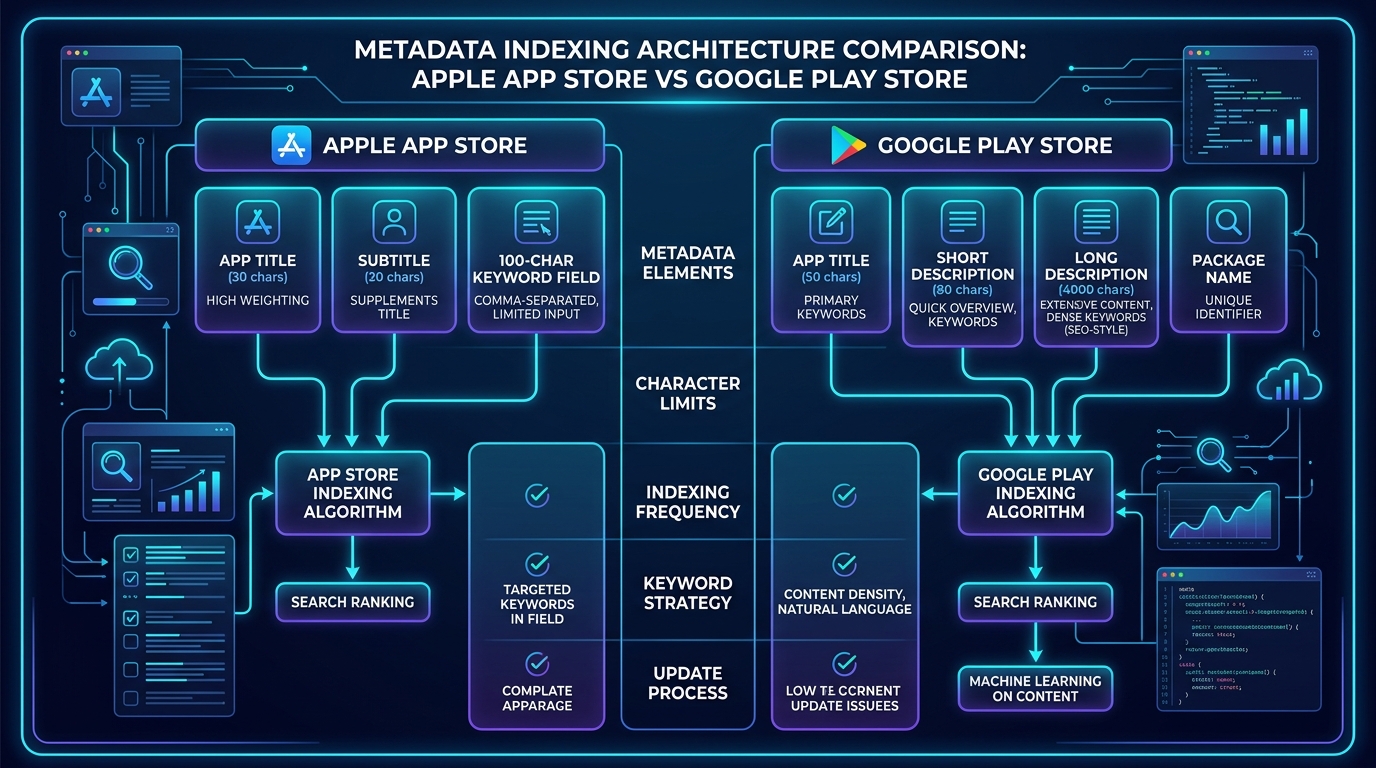
Side-by-side comparison: iOS App Store vs. Google Play metadata
| Metadata field | Apple App Store | Google Play Store | Key difference |
|---|---|---|---|
| App Name / Title | 30 characters (Highest ranking weight) | 30 characters (Highest ranking weight) | Both give maximum ranking power to terms in the title. |
| Subtitle / Short Description | Subtitle: 30 characters (High weight) | Short Description: 80 characters (High weight) | Google offers 50 more characters for primary hook and keywords. |
| Hidden Keyword Field | 100 characters (Comma-separated, high weight) | Does not exist | Apple lets you index hidden terms; Google indexes visible text. |
| Long Description | 4,000 characters (0% search weight) | 4,000 characters (Indexed for keywords & NLP) | Critical difference: Google indexes text density; Apple only uses it for conversion. |
| Package Name / Bundle ID | Bundle ID is not indexed for search | Package Name URL slug is indexed | Android package names (e.g. com.company.budget.tracker) carry permanent ranking power. |
| In-App Purchases / Events | IAP Display Names & In-App Events are indexed | Promotional content events indexed partially | Apple prominently displays and indexes individual IAPs in search results. |
| Developer Name | Indexed for search | Indexed for search | Both stores index the official developer account name. |
| Algorithm update speed | Near-instant (takes effect when new build is approved) | Gradual (takes 5 to 14 days for Google NLP re-crawling) | iOS ranking shifts happen immediately; Android rankings ramp up smoothly. |
Apple App Store ASO deep dive
Apple's indexing engine is deterministic and rule-based. It constructs keyword search combinations by pairing words found across your three primary fields: App Name, Subtitle, and the 100-character keyword field.
1. The 30-character App Name (Title)
The App Name carries the heaviest ranking weight in the App Store ecosystem. If a keyword is not in your title, competing for a #1 to #3 spot against entrenched competitors is significantly harder.
- Recommended structure:
Brand Name: Core Keyword | Secondary Feature - Example:
Zenith: Habit Tracker & Daily Goals(30 characters) - Pro tip: Avoid generic filler words such as "The", "App", "Free", or "Best". Every character counts toward high-intent root terms.
2. The 30-character Subtitle
Introduced in iOS 11, the Subtitle sits directly below your app name on search cards and product pages. It carries the second highest keyword weight and directly impacts conversion rate (tap-through rate).
- Formula:
Action Verb + Key Differentiator + Secondary Keyword - Example:
Track Routines & Build Streaks(29 characters) - Golden rule: Never duplicate words already present in your Title. If "Habit" is in your title, do not repeat "Habit" in your subtitle.
3. The 100-character keyword field rules & hacks
The app store 100 character keyword field is a private metadata field submitted via App Store Connect. Apple combines terms from this field with words in your Title and Subtitle to form composite search queries.
Apple 100-character field syntax guidelines
- No spaces after commas: Use
finance,budget,moneyinstead offinance, budget, money. Removing spaces saves 15-20% of your character budget. - Do not repeat words: Apple automatically combines words across Title, Subtitle, and Keyword Field. If "budget" is in your Title and "planner" is in your Keyword Field, you automatically index for "budget planner".
- Use singular nouns: Apple's algorithm automatically handles most common English plural forms (e.g., entering "recipe" indexes you for "recipes"). Save characters by submitting only the singular version.
- Omit category names and the word "app": Apple automatically indexes your primary category, secondary category, and developer name.
- Cross-localization bonus: In major markets like the US, Apple indexes both the primary language (English US) and secondary secondary localizations (such as Spanish Mexico). This effectively gives you an additional 160 characters of keyword real estate!
4. In-App Events & Custom Product Pages (CPP)
Apple allows you to publish up to 5 active In-App Events (e.g., "Summer Challenge", "Live Tournament", "Flash Sale"). Event titles and short descriptions are fully indexed in search results, giving you temporary boosts for seasonal search phrases without requiring a full binary release.
Google Play Store ASO deep dive
Unlike Apple's rigid field-matching model, Google Play utilizes web-scale indexing models powered by Google's Natural Language Processing (NLP) and Cloud Natural Language API. It reads the entire semantic context of your store listing.
1. The 30-character App Title
Just like on iOS, the Google Play Title is your strongest ranking asset. Ensure your single highest-volume, highest-relevance keyword phrase is placed immediately adjacent to your brand name.
2. The 80-character Short Description
The Short Description is visible above the fold on mobile devices and carries massive weight in Google's ranking algorithm. It serves as both a high-impact conversion pitch and a prime location for your top 2-3 secondary keywords.
- Character budget: Use 75 to 80 characters.
- Target density: Include your primary keyword once and 1-2 core secondary terms naturally.
- Example: "Simple habit tracker and daily routine planner to build productive streaks." (77 characters)
3. The 4,000-character Long Description: Keyword density & NLP
The long description on Google Play is a primary on-metadata indexing factor. Google evaluates the frequency, placement, and semantic relationships (entities) within your text.
| Section | Optimization rule | Recommended frequency |
|---|---|---|
| First 150 words (Intro) | Hook the reader and establish core entity context immediately. | Include primary keyword once in the first 2 sentences. |
| Body paragraphs & feature bullets | Use structured bullet points with clear H2-style bold headings. | Maintain 2% to 3% keyword density across the full text. |
| Closing summary | Summarize use cases and call to action. | Mention primary and secondary variations one final time. |
| Keyword stuffing caution | Avoid unnatural repetition or raw keyword lists. | Never exceed 4% density; Google algorithms will penalize spam. |
4. The Package Name (URL slug) indexing advantage
When creating your Android app in Google Play Console, your package name becomes part of your public URL (e.g., https://play.google.com/store/apps/details?id=com.app.packagename).
Google's search engine indexes keywords contained in the package name string itself. If you include your core keyword in the package identifier at launch (e.g. com.company.habittracker.routine), your app receives a permanent, unchangeable baseline relevancy boost for that keyword.
Conversion rate optimization (CRO): Creative differences
Ranking #1 is only half the battle; if users do not tap and download, both stores will demote your ranking over time. Visual asset requirements differ significantly between platforms:
- iOS App Store Search Results: Users see the App Icon, Title, Subtitle, Star Rating, and either the first three portrait screenshots or one landscape screenshot/video. Your first three portrait screenshots must communicate your value proposition instantly.
- Google Play Search Results: Depending on the search layout, Google often displays only the App Icon, Title, Developer Name, and Star Rating unless branded search cards or video promotions are triggered. This makes your App Icon disproportionately influential on Android click-through rates.
- A/B Testing Native Tools: Apple provides Product Page Optimization (PPO) for testing icons, screenshots, and previews. Google provides Store Listing Experiments, which allows faster traffic allocation across icons, graphics, descriptions, and localized assets.
Cross-platform ASO strategy: Step-by-step workflow
To maintain high rankings across both stores without duplicate overhead, follow this 4-step cross-platform optimization loop:
Step 1: Unified keyword research & opportunity clustering
Begin with comprehensive market research. Build a shared database of seed keywords, competitor phrases, user intent clusters, and search volume estimates. If you are starting from scratch, explore our detailed guide on how to find high-potential app keywords to build your master list.
Step 2: Platform-specific metadata mapping
Split your master keyword list into platform-specific asset sheets:
- iOS Sheet: Assign Tier-1 keywords to Title (30c) and Subtitle (30c). Pack remaining high-value terms into the comma-separated 100-character Keyword Field without spaces or duplicates.
- Google Play Sheet: Assign Tier-1 keywords to Title (30c) and Short Description (80c). Write an engaging 2,500-word Long Description targeting 2-3% keyword density for primary terms and natural LSI (Latent Semantic Indexing) synonyms.
Step 3: Multi-store rank tracking & movement monitoring
Because Apple and Google update rankings on different timelines (instant binary deploys vs. gradual algorithmic re-indexing), monitoring daily fluctuations is essential. Use an ASO rank tracker or a multi-market app keyword tracking tool to track store-specific positions side by side.
If you notice a sudden drop on one store while the other remains steady, consult our diagnostic checklist on why app keyword rankings drop to isolate store-specific algorithm updates or competitor metadata changes.
Step 4: Competitor delta analysis
Keep a close eye on rival apps on both stores. Competitors frequently test new title keywords on Google Play before porting them to iOS. Utilizing a dedicated competitor app keyword tracker lets you spot their keyword tests and counter their positioning before you lose ranking ground.
Cross-platform ASO checklist (Printable summary)
| Task | iOS App Store action | Google Play Store action |
|---|---|---|
| 1. Title Optimization | 30 characters max. Include Brand + Top Keyword. | 30 characters max. Include Brand + Top Keyword. |
| 2. Secondary Field | Subtitle: 30 chars. No duplicate words from Title. | Short Description: 80 chars. 1-2 core keywords with high CTA hook. |
| 3. Keyword Asset | 100-char field: Comma-separated, NO spaces, singular nouns only. | Long Description: 2,500-3,500 words with 2-3% keyword density. |
| 4. Package Identifier | Standard Bundle ID (internal use). | Include primary keyword in Package Name string before first publish. |
| 5. Visual Assets | First 3 portrait screenshots must explain core value prop. | High-contrast, instantly recognizable App Icon for search grids. |
| 6. Post-Update Review | Check ranking immediately after app review approval. | Allow 7-10 days for Google NLP crawler to re-index metadata. |
How Rank Analyzer Pro simplifies cross-platform ASO
Managing separate keyword spreadsheets for iOS App Store and Google Play across dozens of countries quickly becomes overwhelming. Rank Analyzer Pro bridges the gap:
- Unified Storefront Views: Monitor your iOS and Android app rankings side-by-side with country-level precision.
- Automated Daily Rank Tracking: Track keyword movements daily at 09:00 AM IST with clean historical charts and volatility detection.
- Competitor ASO Monitoring: Automatically monitor when competitors change their App Name, Subtitle, or Short Description and correlate it with keyword movement.
- Automated Alert Rules: Receive real-time email and push notifications whenever your app breaks into the Top 3 or drops out of the Top 10.
Whether you are validating keyword viability with a one-time app rank check or managing an enterprise-scale daily tracking schedule, Rank Analyzer Pro provides the data you need to scale organic downloads.
Further reading & official guidelines
For additional developer documentation directly from the platform holders, consult these official resources:
- Apple Developer: App Store Product Page Guidelines — Official advice on App Names, Subtitles, and 100-character keyword field rules.
- Apple Developer: Custom Product Pages (CPP) — Official technical documentation on creating targeted product pages on iOS.
- Google Play Console Help: Optimize your store listing — Official guide on Google Play store presence and metadata policies.
- Google Play Console Help: Run Store Listing Experiments — Official guide on native A/B testing icons, graphics, and descriptions.
Frequently asked questions (FAQ)
Does the iOS App Store index the long description for keywords?
No. Apple's search algorithm completely ignores the long description for search rankings. iOS search indexing relies entirely on the App Name (Title), Subtitle, 100-character Keyword Field, and In-App Purchase/Event names.
How does Google Play index keywords differently than Apple?
Google Play operates like a web search engine. It scans and indexes the App Title (30 chars), Short Description (80 chars), Long Description (4,000 chars), Package Name, and developer name using semantic Natural Language Processing (NLP).
What is the recommended keyword density for Google Play long descriptions?
Aim for a keyword frequency of 2% to 3% (approximately 4 to 5 mentions per target term across a 2,500-3,000 word description). Exceeding 4% risks algorithmic keyword stuffing penalties.
Should you repeat keywords in the iOS Title, Subtitle, and Keyword Field?
No. Repeating keywords across your iOS App Name, Subtitle, or 100-character keyword field provides zero additional ranking weight and wastes valuable character space.
Can I use the exact same ASO metadata for both iOS and Android?
No. Copy-pasting metadata between stores leads to wasted space on iOS (ignoring the 100-char field) and missed ranking opportunities on Android (under-optimizing the long description and short description).
Conclusion
Successful App Store Optimization requires recognizing that Apple and Google solve the discovery problem in fundamentally different ways. Apple demands concise, non-repeating precision across dedicated metadata slots, while Google requires rich, natural, semantically structured context across long-form copy.
By tailoring your metadata to each platform's indexing rules and tracking your keyword positions with an app keyword tracking tool, you can maximize your organic visibility, outperform single-platform competitors, and drive compounding downloads across both stores.